
Real-Time Fund Tracking for Investors
Overview
Self-Selected Fund Assistant is a desktop application designed to help investors monitor their fund performance in real time. The software enables users to track the current value, daily changes, and historical trends of selected investment funds with minimal effort. It is tailored for individuals managing personal portfolios who require timely updates without relying on web browsers or mobile apps. The tool supports both Windows and Mac platforms, making it accessible across major desktop environments. It is particularly useful for users who prefer a lightweight, dedicated application over fragmented web-based solutions.
By providing immediate visibility into fund movements, the software helps users make informed decisions about buying, selling, or holding investments. It is ideal for active investors, long-term savers, and anyone interested in tracking their financial growth. The developer did not provide additional details about the company or development background. However, the regular release notes suggest a focused effort on stability, performance, and user experience. The application runs as a standalone desktop utility, offering a streamlined interface for fund monitoring without unnecessary distractions.
Key Features & Capabilities
- Real-Time Fund Data Updates – The application delivers up-to-date information on fund prices and daily performance, ensuring users have accurate data at all times.
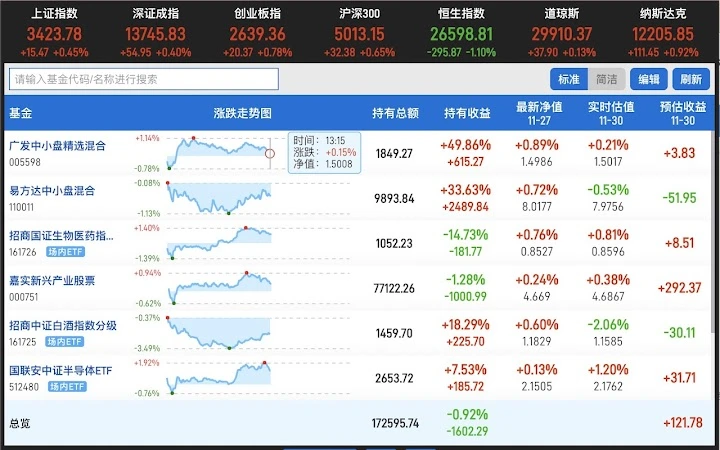
- Visualized Performance Trends – A built-in chart displays fund price movements with clear red and green indicators to distinguish between gains and losses.
- Improved Update Stability – Version v1.6.0 specifically enhances the speed and reliability of fund badge refreshes, reducing delays in data visibility.
- Optimized Data Display – The interface now shows the exact time when fund holdings were last retrieved, improving transparency and trust in the data.
- Compact Interface Mode – A simplified preview mode allows users to quickly check fund status without opening a full window.
These features support efficient portfolio management by reducing the need to switch between multiple tabs or apps. For example, a user can glance at the desktop icon to see if a fund has risen or fallen significantly since the last check. The updated chart design improves readability, especially for users who rely on visual cues to assess investment health. The focus on update reliability ensures that users are not misled by outdated or failed data requests.
User Interface, Workflow & Performance
The application features a clean, minimal interface designed for quick access to critical information. Navigation is straightforward, with essential data presented in a compact layout that avoids clutter. Users can add funds by entering a code or name, and the system retrieves relevant data from external sources. The workflow is optimized for speed, allowing users to set up and monitor funds in under a minute.
Performance details were not specified by the developer. However, the application’s size of 48.2 MB suggests a lightweight footprint, which typically correlates with efficient resource usage. The developer did not provide information about CPU or RAM consumption.
Based on general software behavior, the application likely operates with low overhead during active use. Stability improvements in recent versions indicate ongoing attention to reliability. The software appears to run continuously in the background, updating data at scheduled intervals without disrupting other tasks.
Compatibility & System Requirements
Self-Selected Fund Assistant is compatible with both Windows and Mac operating systems. The software version is v1.6.0, and the installation size is 48.2 MB. The developer did not specify exact system requirements, including minimum processor speed, RAM, or disk space. Platform compatibility information is limited to the two major desktop platforms. No additional hardware dependencies were mentioned.
Users should ensure their system meets standard desktop application requirements for running modern software. The application does not appear to require special drivers or elevated permissions. It is designed to operate on standard desktop environments without additional setup. The lack of detailed system requirements means users may need to test compatibility on older or less common configurations.
Pros and Cons
Pros
- Real-time fund tracking with visual indicators for gains and losses
- Lightweight design with a small installation size
- Regular updates focused on stability and performance
- Supports both Windows and Mac platforms
- Free to use with no licensing barriers
Cons
- No detailed system requirements provided
- Resource usage (CPU/RAM) not disclosed
- Limited information about data sources or security practices
- Interface may lack advanced analytics or portfolio aggregation
- No mention of cloud sync or cross-device access
FAQ Section
Is Self-Selected Fund Assistant available for both Windows and Mac?
Yes, the software is compatible with both Windows and Mac operating systems.
Is the software free to download and use?
Yes, the application is available at no cost. There are no subscription fees or in-app purchases.
Does the software require an internet connection?
Yes, an active internet connection is required to fetch real-time fund data from external sources.
How often does the software update fund data?
Data updates occur at scheduled intervals based on internal timing mechanisms. The latest version includes improvements to update speed and reliability.
Can I use this software offline?
While the application runs locally, it cannot provide live data without an internet connection. Offline access to previously fetched data may be limited.
Final Thoughts
Self-Selected Fund Assistant delivers a focused, efficient solution for investors who need real-time access to fund performance. Its clean interface, consistent updates, and cross-platform availability make it a practical tool for personal finance tracking. While detailed system specifications and resource usage are not provided, the lightweight size and stable release history suggest responsible design. The free pricing model removes financial barriers, making it accessible to a wide audience.
For individuals managing a small to medium-sized fund portfolio, this tool offers a reliable desktop alternative to browser-based trackers. It is especially beneficial for users who value simplicity and speed. The ongoing development and regular improvements indicate a commitment to quality. If you're looking for a straightforward way to monitor your investments without the clutter of full financial platforms, this application is worth trying.
Download Self-Selected Fund Assistant now.







